School Book Cover Mockup PSD & JPG
Imagine showcasing your latest workbook, curriculum guide, or student activity book—not as a flat image, but as a lifelike, professionally styled product sitting on a warm wooden shelf or against a clean, customizable background. That’s exactly what the School Book Cover Mockup PSD & JPG delivers: a realistic, high-resolution visual tool designed specifically for educators, self-publishers, and learning material creators who need to present their work with clarity and credibility.
What It Is—and Why It Matters
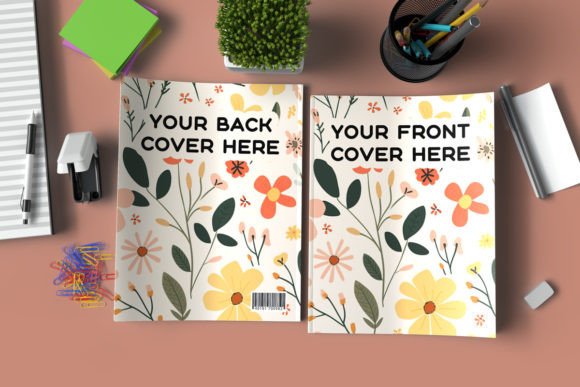
This isn’t just another generic book mockup. It’s a purpose-built, editable template for school-related publications—think lesson planners, classroom handbooks, homeschool journals, or K–12 resource guides. The package includes both layered PSD files (for full customization in Photoshop) and ready-to-use JPG previews. At 3000 x 2000 px resolution and sized for standard 8.5 x 11 inch KDP formatting, it aligns precisely with common print-on-demand requirements.
The front and back cover layers are set up as smart objects—meaning you simply double-click, drop in your design, save, and watch it render instantly in context. No distortion, no guesswork. You can also swap backgrounds: choose from included natural wood textures or switch to a solid color that matches your brand palette—all within seconds.
Who Benefits—and How
Educators and curriculum designers often create original materials for their classrooms or districts—but rarely have time for graphic design polish. With this mockup, they can turn a simple Canva layout or printed PDF into a cohesive, professional-looking product image for grant proposals, staff presentations, or district-wide sharing. One teacher used it to preview her new phonics workbook before ordering bulk prints—her principal approved funding after seeing the polished mockup.
Self-publishing authors and small publishers preparing titles for Amazon KDP appreciate how tightly the dimensions match real-world printing specs. Unlike generic mockups that stretch or crop unexpectedly, this one preserves bleed and safe zones—so what you see is truly what you’ll get. A homeschool blogger recently launched a series of math workbooks; she reused the same mockup across all six titles, changing only the cover art and background tone—keeping her branding consistent while cutting production time in half.
Freelance designers and marketing professionals serving education clients value the well-organized layer structure. Everything is labeled intuitively—cover spine, front, back, shadow, lighting—and grouped logically. When a client requests three variations (light wood, dark wood, white studio), edits take under five minutes each. No hunting through unnamed layers or re-creating shadows manually.
Hobbyists and aspiring creators may hesitate at the mention of “Photoshop required”—but this mockup is beginner-accessible if you’ve ever placed an image into a layer before. The included “How to Use.txt” walks you through each step with plain-language instructions. One user shared that she’d never opened Photoshop until downloading this file—and had her first social media post live within 20 minutes.
Practical Priorities—Matched to Your Needs
If speed matters most to you, the smart object workflow means you’re editing artwork—not adjusting perspective, lighting, or texture. If quality is non-negotiable, the 300 DPI resolution ensures crisp output for web, print proofs, or Amazon thumbnails. For flexibility, the dual PSD/JPG format lets you share quick previews with stakeholders (JPG) while keeping full editability for yourself (PSD).
Business owners evaluating long-term usefulness will notice the thoughtful details: pre-sized for KDP, compatible with standard binding workflows, and built to scale across multiple projects. You’re not buying a one-off image—you’re investing in a reusable asset that grows more valuable the more you use it.
For those weighing cost versus capability: this isn’t free, and it shouldn’t be resold or given away—but its price reflects real utility, not just aesthetics. It saves hours of trial-and-error, avoids misprints due to incorrect sizing, and helps convert casual browsers into confident buyers by presenting your work as finished, trustworthy, and thoughtfully made.
Real Examples—Beyond the Basics
- A university extension program used the mockup to preview their summer STEM camp handbook—replacing placeholder text with actual session titles and instructor photos before sending to the printer.
- An indie illustrator creating bilingual reading journals dropped her watercolor covers into the template, then exported versions with light and dark wood backgrounds to test which resonated more with her Instagram audience.
- A tutoring center owner needed to pitch a new test-prep workbook to local schools. Instead of sending raw PDFs, she embedded her cover design into the mockup and added subtle “Available for Bulk Orders” text on the spine—making the proposal feel tangible and actionable.
Does This Fit Your Next Project?
Ask yourself: Are you preparing a physical or print-on-demand school resource? Do you already have cover artwork—or are you close to finalizing it? Is your goal to communicate professionalism, build trust with parents or administrators, or simply streamline your own workflow?
If yes, this School Book Cover Mockup PSD & JPG serves as both a practical tool and a quiet confidence booster. It doesn’t replace your voice, your expertise, or your content—it simply gives your ideas the visual weight they deserve.
And if your project has unique needs—a custom trim size, a specific binding style, or integration with another platform—you’re welcome to reach out for a customized version. The creator understands that education materials vary widely, and one-size-fits-all rarely fits teaching.
Just remember: these files are licensed for your personal or commercial use—not for resale, redistribution, or bundling as freebies. That ensures ongoing support, updates, and respect for the craft behind thoughtful design tools like this one.