Floral Teacher Business Card: A Practical, Editable Canva Template for Educators
Teaching is deeply relational—and first impressions matter. Whether you're handing out contact information at a parent-teacher conference, leaving a card after a school tour, or sharing your details at an education fair, the Floral Teacher Business Card offers a thoughtful, professional, and visually warm way to represent yourself. It’s not just a printed rectangle of paper—it’s a customizable tool designed specifically for educators who value both aesthetics and utility.
What Makes the Floral Teacher Business Card Distinct?
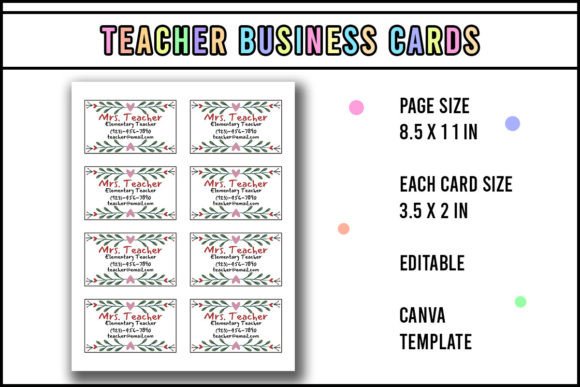
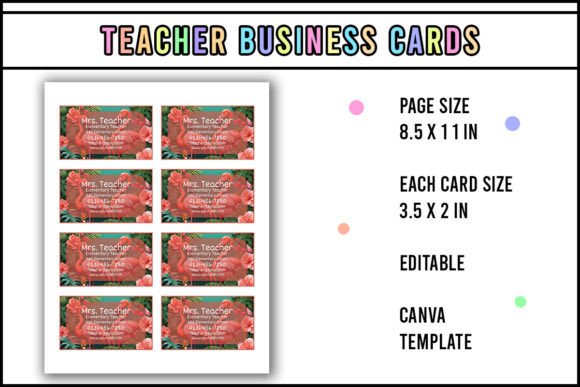
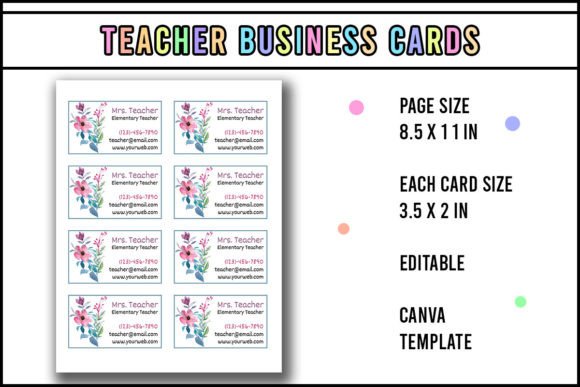
The Floral Teacher Business Card stands apart from generic templates because it merges intentional design with functional flexibility. Its floral motif isn’t merely decorative; it conveys approachability, care, and creativity—qualities many educators embody daily. Unlike minimalist or corporate-style cards, this template balances visual softness with clarity: clean typography, ample white space, and well-organized fields for name, subject, grade level, email, phone, and optional social or classroom links.
Crucially, it’s built as an editable Canva template—not a static PDF or print-only file. That means every element—colors, fonts, layout spacing, even floral accents—is adjustable within Canva’s interface. You don’t need graphic design experience, but you do need access to Canva (free or Pro) to make changes. Once edited, the file is ready for home printing, professional printing, or digital sharing.
How It Compares to Other Options
When evaluating business card solutions, educators often consider three main categories: pre-designed printable templates, custom-designed cards from freelancers or agencies, and fully digital alternatives like QR-linked profiles or e-cards.
- Pre-designed printable templates (like this one) offer speed, affordability, and control. They’re ideal if you want consistency across multiple cards and plan to print in batches. The Floral Teacher Business Card fits here—but with stronger thematic cohesion than many generic “teacher” templates, which often rely on apples, chalkboards, or cartoonish motifs that may feel outdated or overly juvenile.
- Custom-designed cards provide uniqueness and brand alignment but require time, budget, and clear direction. If you’re building a personal teaching brand—say, for coaching, curriculum consulting, or online courses—a custom design might better reflect your voice. However, unless you’re scaling across multiple platforms or audiences, the return on investment is often marginal compared to what the Floral Teacher Business Card delivers for day-to-day classroom use.
- Digital alternatives (e.g., QR codes linked to a Google Site or LinkedIn profile) are convenient and eco-friendly, but they assume consistent device access and internet connectivity—factors that aren’t guaranteed during in-person events or for all families. A physical card remains universally accessible, especially when laminated and magnetized for fridge placement—a practical detail the Floral Teacher Business Card supports explicitly.
Practical Use: Edit, Print, Cut, Laminate, Magnetize
The workflow for the Floral Teacher Business Card is straightforward—but its simplicity rests on realistic expectations. You’ll need to:
- Edit in Canva: Open the template in Canva (you must have a Canva account), replace placeholder text, adjust colors to match your school’s palette or personal preference, and optionally resize or reposition floral elements. No design software beyond Canva is required.
- Print on sturdy paper or cardstock: Standard 4" × 6" or business-card size (3.5" × 2") works. For durability, 110–130 lb cardstock is recommended—especially if you plan to laminate.
- Cut precisely: Use a paper cutter or guillotine for clean edges. Scissors can work for small batches but risk uneven lines.
- Laminate: A 3–5 mil thermal or cold lamination pouch adds water resistance and prevents fading or curling—key for cards that may sit on desks, get passed around, or be stored in backpacks.
- Attach a magnet: Adhesive-backed flexible magnets (available in craft stores or online) let you turn each card into a functional fridge reminder. Parents often appreciate this: it keeps your contact info visible without needing a bulletin board or notebook.
This process takes under 30 minutes for a first batch of 10–20 cards—far less time than commissioning a designer or troubleshooting incompatible file formats.
Strengths and Realistic Tradeoffs
The Floral Teacher Business Card excels in accessibility and adaptability. Its floral aesthetic appeals broadly without leaning into gendered stereotypes—many male educators, special education teachers, and STEM instructors report feeling comfortable using it once they customize colors and tone. It also scales well: edit once, print dozens, and update annually without redesigning from scratch.
However, it has limitations worth acknowledging. Because it’s Canva-based, you cannot edit it in Adobe Illustrator, InDesign, or Microsoft Word. If your school requires strict brand compliance (e.g., mandated fonts, Pantone colors, or logo lockups), you’ll need to verify whether Canva supports those specifications—or whether manual color matching is sufficient. Also, while the template includes space for essential contact fields, it doesn’t support variable data (e.g., auto-filling 30 different student names). For mass personalization, spreadsheet-driven tools would be more appropriate.
When This Template Fits—and When It Doesn’t
The Floral Teacher Business Card is most effective when used by classroom teachers, instructional coaches, or early-career educators who want a polished, warm, and reusable way to share contact information. It’s especially helpful for those who:
- Attend school fairs, open houses, or community events where physical handouts are expected;
- Work with families who benefit from tangible, durable reminders (e.g., younger grades, multilingual households, or homes with limited screen time);
- Prefer hands-on control over design but lack time or budget for custom work;
- Value consistency across materials—e.g., aligning business cards with lesson plan headers or newsletter banners, all edited in the same Canva workspace.
It’s less suited for educators whose primary outreach is digital (e.g., online tutors relying on Zoom profiles and email signatures), or for institutions requiring formal letterhead integration or legal disclaimers on printed materials. Likewise, if your role involves frequent name/title changes—such as rotating department chairs or temporary contract staff—you may find updating and reprinting multiple versions cumbersome versus using a dynamic digital profile.
Making Your Decision Thoughtfully
Choosing a business card isn’t about finding the “best” option—it’s about matching format to function, audience, and effort. The Floral Teacher Business Card sits comfortably in the middle ground: more distinctive than generic templates, more practical than bespoke design, and more enduring than purely digital alternatives. It invites customization without demanding expertise, supports real-world usability (magnets, lamination), and reflects professional identity without sacrificing warmth.
If you’ve tried other templates that felt too rigid, too childish, or too difficult to adapt—and if you already use Canva for newsletters, slide decks, or classroom posters—the Floral Teacher Business Card is worth testing with a small print run. Try editing it with your actual contact details, print one copy, cut and laminate it, then stick it on your fridge. Does it feel like *you*? Does it communicate what you want parents, colleagues, or administrators to remember? That tactile, immediate feedback is often more valuable than any feature list.
Ultimately, the right business card isn’t defined by how it looks in isolation—but by how reliably it helps others reach you, remember your role, and feel confident connecting. The Floral Teacher Business Card supports that goal—not perfectly, but purposefully.